

Programming
Learn how programming languages work, choose a first language and turn a small idea into a tested program you can explain.
Programming is the practice of describing a problem precisely enough that a computer can follow the solution. The most valuable early skill is turning a vague goal into inputs, rules and observable results.
Before You Start
- A text editor and a current Python 3 interpreter for the worked project.
- Basic file and folder navigation. No previous coding experience is required.
YOUR LEARNING ORDER
Learn, Practise and Build
- Understand Programming
Read the language types and reasons to learn before choosing a tool.
- Choose One Practical Language
Start with Python for utilities or HTML and JavaScript for the web; the directory remains available for comparison.
- Run and Change an Example
Copy the relevant Hello, World example, run it in the named environment and change its output.
- Explore Further
Use the complete language resources. Esoteric languages are optional experiments after the fundamentals.
Your project: Build a Python program that takes fictional study sessions, validates their duration, totals time by topic and reports useful errors. Extend it only after the small version works.
Go to the practice projectSECTION 01
What is Programming Language?
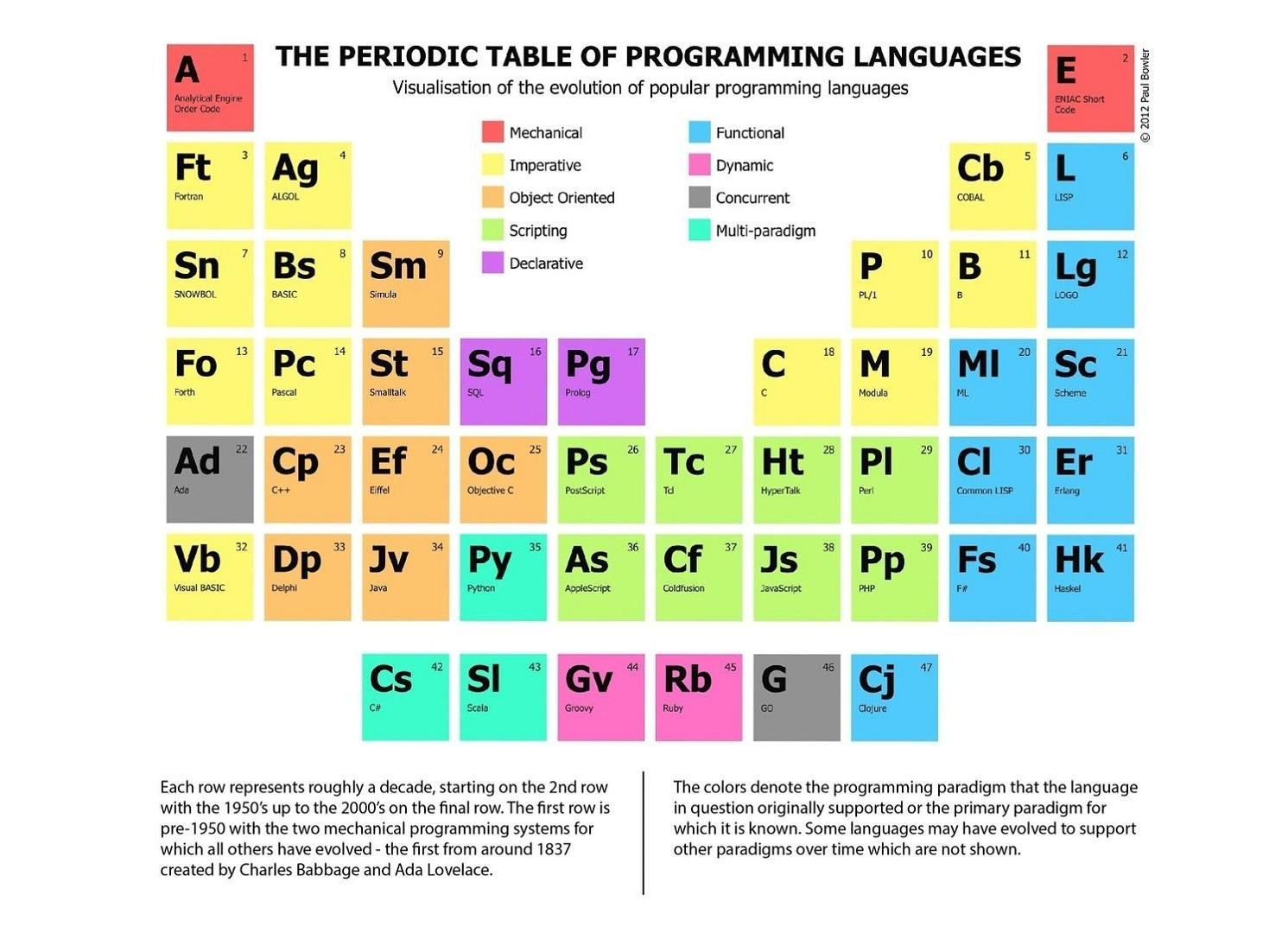
Programming languages are formal languages used to communicate instructions to a computer. They are used to write software, which is a set of instructions that a computer can understand and execute. A programming language consists of a set of rules, syntax, and semantics that are used to write computer programs.
There are many programming languages, each with its own strengths and weaknesses, and each designed for different purposes. Some programming languages are general-purpose, meaning they can be used for a wide range of applications, while others are designed for specific tasks or platforms. Examples of popular programming languages include C++, Java, Python, JavaScript, Ruby, and Swift.
Programmers use programming languages to write code, which is a set of instructions that tells a computer what to do. Code can range from simple instructions to complex algorithms, and it can be written for a variety of applications, including web development, mobile app development, game development, scientific computing, and more.
 Open full-size image ↗
SECTION 02
Types of Programming Languages
Programming languages can be devided into one or more of the following types :
- Procedural Programming Languages : These languages follow a set of steps or procedures to execute a program. Examples include C, Fortran, Pascal, BASIC and COBOL.
- Object-Oriented Programming Languages : These languages are based on the concept of objects, which have attributes and methods. Examples include Java, Python, C++, and Ruby.
- Functional Programming Languages : These languages treat computation as the evaluation of mathematical functions and avoid changing state and mutable data. Examples include Haskell, Lisp, and ML.
- Scripting Languages : These languages are interpreted rather than compiled and are designed to automate tasks or perform simple tasks. Examples include Bash, Python, PHP, and Perl.
- Markup Languages : These languages are used to define and format text, data, and other content for display on the web. Examples include HTML, XML, and JSON.
- Query Languages : These languages are used to retrieve and manipulate data stored in databases. Examples include SQL, XQuery, and SPARQL.
- Domain-Specific Languages : These languages are designed for specific tasks or industries and have a limited scope of use. Examples include MATLAB, R, and VHDL.
- Low-Level Languages : These languages interact directly with the hardware and are used to write operating systems, device drivers, and other system-level software. Examples include Assembly language and machine language.
These are just a few examples of the many types of programming languages in use today.
SECTION 03
Why Should You Learn How To Code?
- You can automate many tasks which usually take lots of time to complete.
- To understand others program and exploits and it will also help you in custom exploitation.
- Most importently, it prevents you from becoming a script kiddies.
SECTION 04
Programming Languages You Should Learn
Wikipedia claims there are approximately 700 programming languages, while others say that number is closer to 9000! The truth is, there've been countless programming languages created throughout history. ( List of programming languages - Wikipedia)
But here i will mention only those programming languages that will help you to becoming a good hacker.
[some of these are not technically a programming language. They are markup, style sheet, and database management languages that are included in the list for those who may consider them as a programming language.]
SECTION 05
Assembly
In computer programming, assembly language, often abbreviated asm, is any low-level programming language in which there is a very strong correspondence between the instructions in the language and the architecture's machine code instructions.
DATA SEGMENT
    MESSAGE DB "Hello, World!$"
DATA ENDS

CODE SEGMENT
    ASSUME DS:DATA, CS:CODE
START:
    MOV AX, DATA
    MOV DS, AX
    LEA DX, MESSAGE
    MOV AH, 9
    INT 21H
    MOV AH, 4CH
    INT 21H
CODE ENDS
END START
Expected Output
Hello, World!SECTION 06
Bash
Bash is a Unix shell and command language written by Brian Fox for the GNU Project as a free software replacement for the Bourne shell. Bash is a command processor that typically runs in a text window where the user types commands that cause actions.
echo "Hello, World!"Expected Output
Hello, World!SECTION 07
Batch File
A batch file is a script file in DOS, OS/2 and Microsoft Windows. It consists of a series of commands to be executed by the command-line interpreter, stored in a plain text file.
ECHO Hello, World!Expected Output
Hello, World!SECTION 08
C Programming
C is a general-purpose, procedural computer programming language supporting structured programming, lexical variable scope, and recursion, with a static type system. By design, C provides constructs that map efficiently to typical machine instructions.
#include <stdio.h>
int main(void) {
    printf("Hello, World!\n");
    return 0;
}
Expected Output
Hello, World!- C Programming Tutorial (YouTube)
- A to Z of C - Reference title; the entry did not include a source link.
- C - Geeks for Geeks
- learn-c.org
- C Programming (w3schools.in)
SECTION 09
C++
C++ is a general-purpose programming language created by Bjarne Stroustrup as an extension of the C programming language, or "C with Classes".
#include <iostream>
int main() {
    std::cout << "Hello, World!\n";
    return 0;
}
Expected Output
Hello, World!- C++ Tutorial
- Learn Cpp
- C++ Language Tutorial (PDF)
- Buckys C++ Programming Tutorials (YouTube)
- C++ Tutorial
- C++ For Programmers (Free Course)
SECTION 10
Go Language
Go is a statically typed, compiled programming language designed at Google by Robert Griesemer, Rob Pike, and Ken Thompson. Go is syntactically similar to C, but with memory safety, garbage collection, structural typing, and CSP-style concurrency.
package main

import "fmt"

func main() {
    fmt.Println("Hello, World!")
}go run hello-world.goExpected Output
Hello, World!SECTION 11
HTML
Hypertext Markup Language is the standard markup language for documents designed to be displayed in a web browser. It can be assisted by technologies such as Cascading Style Sheets (CSS) and scripting languages such as JavaScript.
<html>
    <body>
        <h1>Hello, World!</h1>
    </body>
</html>SECTION 12
Java
Java is a class-based, object-oriented programming language that is designed to have as few implementation dependencies as possible.
class HelloWorld {
    public static void main(String[] args) {
        System.out.println("Hello, World!");
    }
}
Expected Output
Hello, World!SECTION 13
JavaScript
JavaScript, often abbreviated as JS, is a programming language that conforms to the ECMAScript specification. JavaScript is high-level, often just-in-time compiled, and multi-paradigm. It has curly-bracket syntax, dynamic typing, prototype-based object-orientation, and first-class functions.
console.log('Hello, World!');Expected Output
Hello, World!alert("Hello, World!");Expected Output
Hello, World!document.write('Hello, World!');Expected Output
Hello, World!SECTION 14
Perl
Perl is a family of two high-level, general-purpose, interpreted, dynamic programming languages. "Perl" refers to Perl 5, but from 2000 to 2019 it also referred to its redesigned "sister language", Perl 6, before the latter's name was officially changed to Raku in October 2019.
#!/usr/bin/perl
use strict;
use warnings;
print("Hello, World!\n");perl HelloWorld.plExpected Output
Hello, World!SECTION 15
Php
PHP is a general-purpose scripting language especially suited to web development. It was originally created by Danish-Canadian programmer Rasmus Lerdorf in 1994. The PHP reference implementation is now produced by The PHP Group.
<!doctype html>
<html lang="en">
  <body>
    <?php echo "Hello, World!"; ?>
  </body>
</html>- PHP Tutorial
- Getting Started with PHP - The original address is unavailable. This reference is retained; the linked alternative covers the same learning area. Official PHP Tutorial
- PHP Tutorials by TheNewBoston (YouTube)
- PHP Programming Tutorials (YouTube)
- PHP The Right Way
SECTION 16
PowerShell
PowerShell is a task automation and configuration management framework from Microsoft, consisting of a command-line shell and the associated scripting language.
Write-Host 'Hello, World!'Expected Output
Hello, World!- Getting Started with Windows PowerShell
- Getting Started with Microsoft PowerShell
- Learn Windows PowerShell in a Month of Lunches
- PowerShell Tutorial - The former course URL redirects to the vendor homepage rather than the course. Microsoft PowerShell Introduction
SECTION 17
Python
Python is an interpreted, high-level and general-purpose programming language. Python's design philosophy emphasizes code readability with its notable use of significant whitespace.
print('Hello, World!')Expected Output
Hello, World!SECTION 18
R Language
R is a programming language and free software environment for statistical computing and graphics supported by the R Foundation for Statistical Computing. The R language is widely used among statisticians and data miners for developing statistical software and data analysis.
myString <- "Hello, World!"
print(myString)
Expected Output
[1] "Hello, World!"SECTION 19
Ruby
Ruby is an interpreted, high-level, general-purpose programming language. It was designed and developed in the mid-1990s by Yukihiro "Matz" Matsumoto in Japan. Ruby is dynamically typed and uses garbage collection.
puts "Hello, World!"ruby helloworld.rbExpected Output
Hello, World!- Programming Ruby - The original book address and the documentation index’s linked mirror are unavailable. The book name is retained; this alternative provides current Ruby documentation and tutorials. Ruby Documentation and Tutorials
- Ruby Tutorial
- Ruby Programming Tutorials by Jake Day Williams (YouTube)
- I Love Ruby
- Core Ruby Programming
SECTION 20
Rust
Rust is a multi-paradigm programming language designed for performance and safety, especially safe concurrency. Rust is syntactically similar to C++, but can guarantee memory safety by using a borrow checker to validate references.
fn main() {
    println!("Hello, World!");
}rustc hello.rs
./helloExpected Output
Hello, World!SECTION 21
SQL
SQL is a domain-specific language used in programming and designed for managing data held in a relational database management system, or for stream processing in a relational data stream management system.
SET SERVEROUTPUT ON;
BEGIN
    DBMS_OUTPUT.PUT_LINE('Hello, World!');
END;
/
Expected Output
Hello, World!SECTION 22
Visual Basic
Visual Basic is a third-generation event-driven programming language from Microsoft known for its Component Object Model programming model first released in 1991 and declared legacy during 2008. Microsoft intended Visual Basic to be relatively easy to learn and use.
Module HelloWorld
Sub Main( )
Console.WriteLine("Hello, World!")
End Sub
End Module
Expected Output
Hello, World!- Visual Basic (VB) Tutorial
- Visual Basic Tutorial by TheNewBoston - Reference title; the entry did not include a source link. (YouTube)
- Visual Basic Tutorial by Derek Banas - Reference title; the entry did not include a source link. (YouTube)
SECTION 23
VBScript
VBScript is an Active Scripting language developed by Microsoft that is modeled on Visual Basic. It allows Microsoft Windows system administrators to generate powerful tools for managing computers with error handling, subroutines, and other advanced programming constructs.
MsgBox "Hello, World!"Expected Output
Hello, World!- VBScript Tutorial - Tutorialspoint
- VBScript - Reference title; the entry did not include a source link.
- VBScript Tutorial - Quackit
SECTION 24
Esoteric Programming Language
An esoteric programming language (sometimes shortened to esolang) is a programming language designed to test the boundaries of computer programming language design, as a proof of concept, as software art, as a hacking interface to another language (particularly functional programming or procedural programming languages), or as a joke. The use of esoteric distinguishes these languages from programming languages that working developers use to write software. Usually, an esolang's creators do not intend the language to be used for mainstream programming, although some esoteric features, such as visuospatial syntax, have inspired practical applications in the arts. Such languages are often popular among hackers and hobbyists.
These languages are mostly used in CTF Challenges. there is no need to learn them completely just understand that whenever you look at a code or script you can identify what programming language it is. so here i would like to mention some Esolangs.
SECTION 25
ArnoldC
Programming language based on the one-liners of Arnold Schwarzenegger.
IT'S SHOWTIME
TALK TO THE HAND "Hello, World!"
YOU HAVE BEEN TERMINATED
Expected Output
Hello, World!SECTION 26
Befunge
Befunge is a stack-based, reflective, esoteric programming language. It differs from conventional languages in that programs are arranged on a two-dimensional grid. "Arrow" instructions direct the control flow to the left, right, up or down, and loops are constructed by sending the control flow in a cycle.
"!dlroW ,olleH">:#,_@Expected Output
Hello, World!SECTION 27
Brainfuck
Brainfuck is an esoteric programming language created in 1993 by Urban Müller. Notable for its extreme minimalism, the language consists of only eight simple commands and an instruction pointer. While it is fully Turing complete, it is not intended for practical use, but to challenge and amuse programmers.
++++++++++[>+>+++>+++++++>++++++++++<<<<-]>>>++.>+.+++++++..+++.<<++++++++++++++.------------.>+++++++++++++++.>.+++.------.--------.<<+.SECTION 28
Chef
Chef is a programming language in which programs look like recipes.
Hello World Souffle.

This recipe prints the immortal words "Hello world!", in a basically brute force way. It also makes a lot of food for one person.

Ingredients.
72 g haricot beans
101 eggs
108 g lard
111 cups oil
32 zucchinis
119 ml water
114 g red salmon
100 g dijon mustard
33 potatoes

Method.
Put potatoes into the mixing bowl. Put dijon mustard into the mixing bowl. Put lard into the mixing bowl. Put red salmon into the mixing bowl. Put oil into the mixing bowl. Put water into the mixing bowl. Put zucchinis into the mixing bowl. Put oil into the mixing bowl. Put lard into the mixing bowl. Put lard into the mixing bowl. Put eggs into the mixing bowl. Put haricot beans into the mixing bowl. Liquefy contents of the mixing bowl. Pour contents of the mixing bowl into the baking dish.

Serves 1.SECTION 29
Cow
The COW programming language is an esoteric programming language created by Sean Heber in 2003. It is a Brainfuck variant designed humorously with Bovinae in mind. COW has twelve instructions (four more than Brainfuck) and is Turing-complete. Most instructions are moos, only the capitalization varies: mOo, moO, mOO, Moo, and so on. MMM, OOO, oom and OOM are the exceptions. All other character combinations are ignored and treated as comments.
MoO MoO MoO MoO MoO MoO MoO MoO MoO MoO MoO MoO MoO MoO MoO MoO MoO MoO MoO MoO MoO MoO MoO MoO MoO MoO MoO MoO MoO MoO MoO MoO MoO MoO MoO MoO MoO MoO MoO MoO MoO MoO MoO MoO MoO MoO MoO MoO MoO MoO MoO MoO MoO MoO MoO MoO MoO MoO MoO MoO MoO MoO MoO MoO MoO MoO MoO MoO MoO MoO MoO MoO Moo MoO MoO MoO MoO MoO MoO MoO MoO MoO MoO MoO MoO MoO MoO MoO MoO MoO MoO MoO MoO MoO MoO MoO MoO MoO MoO MoO MoO MoO Moo MoO MoO MoO MoO MoO MoO MoO Moo Moo MoO MoO MoO Moo OOO MoO MoO MoO MoO MoO MoO MoO MoO MoO MoO MoO MoO MoO MoO MoO MoO MoO MoO MoO MoO MoO MoO MoO MoO MoO MoO MoO MoO MoO MoO MoO MoO MoO MoO MoO MoO MoO MoO MoO MoO MoO MoO MoO MoO Moo MoO MoO MoO MoO MoO MoO MoO MoO MoO MoO MoO MoO MoO MoO MoO MoO MoO MoO MoO MoO MoO MoO MoO MoO MoO MoO MoO MoO MoO MoO MoO MoO MoO MoO MoO MoO MoO MoO MoO MoO MoO MoO MoO MoO MoO MoO MoO MoO MoO MoO MoO MoO MoO MoO MoO MoO MoO MoO MoO MoO MoO MoO MoO MoO MoO MoO MoO MoO MoO MoO MoO MoO MoO MoO MoO MoO MoO MoO MoO MoO MoO MoO MoO MoO MoO MoO MoO MoO MoO MoO MoO MoO MoO MoO MoO MoO MoO MoO MoO MoO MoO MoO MoO MoO MoO MoO MoO MoO MoO MoO MoO MoO MoO MoO MoO MoO Moo MOo MOo MOo MOo MOo MOo MOo MOo MOo MOo MOo MOo MOo MOo MOo MOo MOo MOo MOo MOo MOo MOo MOo MOo MOo MOo MOo MOo MOo MOo MOo MOo MOo MOo MOo MOo MOo MOo MOo MOo MOo Moo MOo MOo MOo MOo MOo MOo MOo MOo Moo MoO MoO MoO Moo MOo MOo MOo MOo MOo MOo Moo MOo MOo MOo MOo MOo MOo MOo MOo Moo OOO MoO MoO MoO MoO MoO MoO MoO MoO MoO MoO MoO MoO MoO MoO MoO MoO MoO MoO MoO MoO MoO MoO MoO MoO MoO MoO MoO MoO MoO MoO MoO MoO MoO MooSECTION 30
Intercal
Intercal (full name is Compiler Language With No Pronounceable Acronym, so short name is rather random) is one of the oldest esoteric programming languages. It was developed in 1972 as a parody on other languages that existed at that time; modern esoteric languages beat it in weirdness, but some aspects of it, like character output, are beyond compare. Its reference manual is a work of art on itself (unlike modern languages, which concentrate on meaning of commands, not on literal description), with special names for nearly every common thing. One of the features INTERCAL is famous for is its PLEASE modifier: it serves no other purpose than to make programmer polite, but not too polite.
DO ,1 <- #13
PLEASE DO ,1 SUB #1 <- #238
DO ,1 SUB #2 <- #108
DO ,1 SUB #3 <- #112
DO ,1 SUB #4 <- #0
DO ,1 SUB #5 <- #64
DO ,1 SUB #6 <- #194
PLEASE DO ,1 SUB #7 <- #48
DO ,1 SUB #8 <- #26
DO ,1 SUB #9 <- #244
PLEASE DO ,1 SUB #10 <- #168
DO ,1 SUB #11 <- #24
DO ,1 SUB #12 <- #16
DO ,1 SUB #13 <- #162
PLEASE READ OUT ,1
PLEASE GIVE UPSECTION 31
JSFuck
JSFuck is an esoteric programming style of JavaScript, where code is written using only six characters: [, ], (, ), !, and +. Unlike Brainfuck, which requires its own compiler or interpreter, JSFuck is valid JavaScript code, meaning JSFuck programs can be run in any web browser or engine that interprets JavaScript.
[][(![]+[])[+[]]+(![]+[])[!+[]+!+[]]+(![]+[])[+!+[]]+(!![]+[])[+[]]][([][(![]+[])[+[]]+(![]+[])[!+[]+!+[]]+(![]+[])[+!+[]]+(!![]+[])[+[]]]+[])[!+[]+!+[]+!+[]]+(!![]+[][(![]+[])[+[]]+(![]+[])[!+[]+!+[]]+(![]+[])[+!+[]]+(!![]+[])[+[]]])[+!+[]+[+[]]]+([][[]]+[])[+!+[]]+(![]+[])[!+[]+!+[]+!+[]]+(!![]+[])[+[]]+(!![]+[])[+!+[]]+([][[]]+[])[+[]]+([][(![]+[])[+[]]+(![]+[])[!+[]+!+[]]+(![]+[])[+!+[]]+(!![]+[])[+[]]]+[])[!+[]+!+[]+!+[]]+(!![]+[])[+[]]+(!![]+[][(![]+[])[+[]]+(![]+[])[!+[]+!+[]]+(![]+[])[+!+[]]+(!![]+[])[+[]]])[+!+[]+[+[]]]+(!![]+[])[+!+[]]]((!![]+[])[+!+[]]+(!![]+[])[!+[]+!+[]+!+[]]+(!![]+[])[+[]]+([][[]]+[])[+[]]+(!![]+[])[+!+[]]+([][[]]+[])[+!+[]]+(+[![]]+[][(![]+[])[+[]]+(![]+[])[!+[]+!+[]]+(![]+[])[+!+[]]+(!![]+[])[+[]]])[+!+[]+[+!+[]]]+(!![]+[])[!+[]+!+[]+!+[]]+(+(!+[]+!+[]+!+[]+[+!+[]]))[(!![]+[])[+[]]+(!![]+[][(![]+[])[+[]]+(![]+[])[!+[]+!+[]]+(![]+[])[+!+[]]+(!![]+[])[+[]]])[+!+[]+[+[]]]+([]+[])[([][(![]+[])[+[]]+(![]+[])[!+[]+!+[]]+(![]+[])[+!+[]]+(!![]+[])[+[]]]+[])[!+[]+!+[]+!+[]]+(!![]+[][(![]+[])[+[]]+(![]+[])[!+[]+!+[]]+(![]+[])[+!+[]]+(!![]+[])[+[]]])[+!+[]+[+[]]]+([][[]]+[])[+!+[]]+(![]+[])[!+[]+!+[]+!+[]]+(!![]+[])[+[]]+(!![]+[])[+!+[]]+([][[]]+[])[+[]]+([][(![]+[])[+[]]+(![]+[])[!+[]+!+[]]+(![]+[])[+!+[]]+(!![]+[])[+[]]]+[])[!+[]+!+[]+!+[]]+(!![]+[])[+[]]+(!![]+[][(![]+[])[+[]]+(![]+[])[!+[]+!+[]]+(![]+[])[+!+[]]+(!![]+[])[+[]]])[+!+[]+[+[]]]+(!![]+[])[+!+[]]][([][[]]+[])[+!+[]]+(![]+[])[+!+[]]+((+[])[([][(![]+[])[+[]]+(![]+[])[!+[]+!+[]]+(![]+[])[+!+[]]+(!![]+[])[+[]]]+[])[!+[]+!+[]+!+[]]+(!![]+[][(![]+[])[+[]]+(![]+[])[!+[]+!+[]]+(![]+[])[+!+[]]+(!![]+[])[+[]]])[+!+[]+[+[]]]+([][[]]+[])[+!+[]]+(![]+[])[!+[]+!+[]+!+[]]+(!![]+[])[+[]]+(!![]+[])[+!+[]]+([][[]]+[])[+[]]+([][(![]+[])[+[]]+(![]+[])[!+[]+!+[]]+(![]+[])[+!+[]]+(!![]+[])[+[]]]+[])[!+[]+!+[]+!+[]]+(!![]+[])[+[]]+(!![]+[][(![]+[])[+[]]+(![]+[])[!+[]+!+[]]+(![]+[])[+!+[]]+(!![]+[])[+[]]])[+!+[]+[+[]]]+(!![]+[])[+!+[]]]+[])[+!+[]+[+!+[]]]+(!![]+[])[!+[]+!+[]+!+[]]]](!+[]+!+[]+!+[]+[!+[]+!+[]])+(![]+[])[+!+[]]+(![]+[])[!+[]+!+[]])()([][(![]+[])[+[]]+(![]+[])[!+[]+!+[]]+(![]+[])[+!+[]]+(!![]+[])[+[]]][([][(![]+[])[+[]]+(![]+[])[!+[]+!+[]]+(![]+[])[+!+[]]+(!![]+[])[+[]]]+[])[!+[]+!+[]+!+[]]+(!![]+[][(![]+[])[+[]]+(![]+[])[!+[]+!+[]]+(![]+[])[+!+[]]+(!![]+[])[+[]]])[+!+[]+[+[]]]+([][[]]+[])[+!+[]]+(![]+[])[!+[]+!+[]+!+[]]+(!![]+[])[+[]]+(!![]+[])[+!+[]]+([][[]]+[])[+[]]+([][(![]+[])[+[]]+(![]+[])[!+[]+!+[]]+(![]+[])[+!+[]]+(!![]+[])[+[]]]+[])[!+[]+!+[]+!+[]]+(!![]+[])[+[]]+(!![]+[][(![]+[])[+[]]+(![]+[])[!+[]+!+[]]+(![]+[])[+!+[]]+(!![]+[])[+[]]])[+!+[]+[+[]]]+(!![]+[])[+!+[]]]((!![]+[])[+!+[]]+(!![]+[])[!+[]+!+[]+!+[]]+(!![]+[])[+[]]+([][[]]+[])[+[]]+(!![]+[])[+!+[]]+([][[]]+[])[+!+[]]+([]+[])[(![]+[])[+[]]+(!![]+[][(![]+[])[+[]]+(![]+[])[!+[]+!+[]]+(![]+[])[+!+[]]+(!![]+[])[+[]]])[+!+[]+[+[]]]+([][[]]+[])[+!+[]]+(!![]+[])[+[]]+([][(![]+[])[+[]]+(![]+[])[!+[]+!+[]]+(![]+[])[+!+[]]+(!![]+[])[+[]]]+[])[!+[]+!+[]+!+[]]+(!![]+[][(![]+[])[+[]]+(![]+[])[!+[]+!+[]]+(![]+[])[+!+[]]+(!![]+[])[+[]]])[+!+[]+[+[]]]+(![]+[])[!+[]+!+[]]+(!![]+[][(![]+[])[+[]]+(![]+[])[!+[]+!+[]]+(![]+[])[+!+[]]+(!![]+[])[+[]]])[+!+[]+[+[]]]+(!![]+[])[+!+[]]]()[+!+[]+[!+[]+!+[]]]+((!![]+[])[+[]]+[+!+[]]+[+!+[]]+[+[]]+(!![]+[])[!+[]+!+[]+!+[]]+(![]+[])[!+[]+!+[]]+(![]+[])[!+[]+!+[]]+(!![]+[])[+[]]+[+!+[]]+[!+[]+!+[]+!+[]+!+[]+!+[]]+[!+[]+!+[]+!+[]+!+[]+!+[]+!+[]+!+[]]+(!![]+[])[+[]]+[!+[]+!+[]+!+[]+!+[]+!+[]]+[!+[]+!+[]+!+[]+!+[]]+(!![]+[])[+[]]+[!+[]+!+[]+!+[]+!+[]]+[+[]]+(!![]+[])[+[]]+[+!+[]]+[!+[]+!+[]]+[!+[]+!+[]+!+[]+!+[]+!+[]+!+[]+!+[]]+(!![]+[])[+[]]+[+!+[]]+[!+[]+!+[]+!+[]+!+[]+!+[]]+[!+[]+!+[]+!+[]+!+[]+!+[]+!+[]+!+[]]+(!![]+[])[+!+[]]+(![]+[])[!+[]+!+[]]+([][[]]+[])[!+[]+!+[]]+(!![]+[])[+[]]+[!+[]+!+[]+!+[]+!+[]]+[+!+[]])[(![]+[])[!+[]+!+[]+!+[]]+(+(!+[]+!+[]+[+!+[]]+[+!+[]]))[(!![]+[])[+[]]+(!![]+[][(![]+[])[+[]]+(![]+[])[!+[]+!+[]]+(![]+[])[+!+[]]+(!![]+[])[+[]]])[+!+[]+[+[]]]+([]+[])[([][(![]+[])[+[]]+(![]+[])[!+[]+!+[]]+(![]+[])[+!+[]]+(!![]+[])[+[]]]+[])[!+[]+!+[]+!+[]]+(!![]+[][(![]+[])[+[]]+(![]+[])[!+[]+!+[]]+(![]+[])[+!+[]]+(!![]+[])[+[]]])[+!+[]+[+[]]]+([][[]]+[])[+!+[]]+(![]+[])[!+[]+!+[]+!+[]]+(!![]+[])[+[]]+(!![]+[])[+!+[]]+([][[]]+[])[+[]]+([][(![]+[])[+[]]+(![]+[])[!+[]+!+[]]+(![]+[])[+!+[]]+(!![]+[])[+[]]]+[])[!+[]+!+[]+!+[]]+(!![]+[])[+[]]+(!![]+[][(![]+[])[+[]]+(![]+[])[!+[]+!+[]]+(![]+[])[+!+[]]+(!![]+[])[+[]]])[+!+[]+[+[]]]+(!![]+[])[+!+[]]][([][[]]+[])[+!+[]]+(![]+[])[+!+[]]+((+[])[([][(![]+[])[+[]]+(![]+[])[!+[]+!+[]]+(![]+[])[+!+[]]+(!![]+[])[+[]]]+[])[!+[]+!+[]+!+[]]+(!![]+[][(![]+[])[+[]]+(![]+[])[!+[]+!+[]]+(![]+[])[+!+[]]+(!![]+[])[+[]]])[+!+[]+[+[]]]+([][[]]+[])[+!+[]]+(![]+[])[!+[]+!+[]+!+[]]+(!![]+[])[+[]]+(!![]+[])[+!+[]]+([][[]]+[])[+[]]+([][(![]+[])[+[]]+(![]+[])[!+[]+!+[]]+(![]+[])[+!+[]]+(!![]+[])[+[]]]+[])[!+[]+!+[]+!+[]]+(!![]+[])[+[]]+(!![]+[][(![]+[])[+[]]+(![]+[])[!+[]+!+[]]+(![]+[])[+!+[]]+(!![]+[])[+[]]])[+!+[]+[+[]]]+(!![]+[])[+!+[]]]+[])[+!+[]+[+!+[]]]+(!![]+[])[!+[]+!+[]+!+[]]]](!+[]+!+[]+!+[]+[+!+[]])[+!+[]]+(![]+[])[!+[]+!+[]]+([![]]+[][[]])[+!+[]+[+[]]]+(!![]+[])[+[]]]((!![]+[])[+[]])[([][(!![]+[])[!+[]+!+[]+!+[]]+([][[]]+[])[+!+[]]+(!![]+[])[+[]]+(!![]+[])[+!+[]]+([![]]+[][[]])[+!+[]+[+[]]]+(!![]+[])[!+[]+!+[]+!+[]]+(![]+[])[!+[]+!+[]+!+[]]]()+[])[!+[]+!+[]+!+[]]+(!![]+[][(![]+[])[+[]]+(![]+[])[!+[]+!+[]]+(![]+[])[+!+[]]+(!![]+[])[+[]]])[+!+[]+[+[]]]+([![]]+[][[]])[+!+[]+[+[]]]+([][[]]+[])[+!+[]]](([][(![]+[])[+[]]+(![]+[])[!+[]+!+[]]+(![]+[])[+!+[]]+(!![]+[])[+[]]][([][(![]+[])[+[]]+(![]+[])[!+[]+!+[]]+(![]+[])[+!+[]]+(!![]+[])[+[]]]+[])[!+[]+!+[]+!+[]]+(!![]+[][(![]+[])[+[]]+(![]+[])[!+[]+!+[]]+(![]+[])[+!+[]]+(!![]+[])[+[]]])[+!+[]+[+[]]]+([][[]]+[])[+!+[]]+(![]+[])[!+[]+!+[]+!+[]]+(!![]+[])[+[]]+(!![]+[])[+!+[]]+([][[]]+[])[+[]]+([][(![]+[])[+[]]+(![]+[])[!+[]+!+[]]+(![]+[])[+!+[]]+(!![]+[])[+[]]]+[])[!+[]+!+[]+!+[]]+(!![]+[])[+[]]+(!![]+[][(![]+[])[+[]]+(![]+[])[!+[]+!+[]]+(![]+[])[+!+[]]+(!![]+[])[+[]]])[+!+[]+[+[]]]+(!![]+[])[+!+[]]]((!![]+[])[+!+[]]+(!![]+[])[!+[]+!+[]+!+[]]+(!![]+[])[+[]]+([][[]]+[])[+[]]+(!![]+[])[+!+[]]+([][[]]+[])[+!+[]]+(![]+[+[]])[([![]]+[][[]])[+!+[]+[+[]]]+(!![]+[])[+[]]+(![]+[])[+!+[]]+(![]+[])[!+[]+!+[]]+([![]]+[][[]])[+!+[]+[+[]]]+([][(![]+[])[+[]]+(![]+[])[!+[]+!+[]]+(![]+[])[+!+[]]+(!![]+[])[+[]]]+[])[!+[]+!+[]+!+[]]+(![]+[])[!+[]+!+[]+!+[]]]()[+!+[]+[+[]]]+![]+(![]+[+[]])[([![]]+[][[]])[+!+[]+[+[]]]+(!![]+[])[+[]]+(![]+[])[+!+[]]+(![]+[])[!+[]+!+[]]+([![]]+[][[]])[+!+[]+[+[]]]+([][(![]+[])[+[]]+(![]+[])[!+[]+!+[]]+(![]+[])[+!+[]]+(!![]+[])[+[]]]+[])[!+[]+!+[]+!+[]]+(![]+[])[!+[]+!+[]+!+[]]]()[+!+[]+[+[]]])()[([][(![]+[])[+[]]+(![]+[])[!+[]+!+[]]+(![]+[])[+!+[]]+(!![]+[])[+[]]]+[])[!+[]+!+[]+!+[]]+(!![]+[][(![]+[])[+[]]+(![]+[])[!+[]+!+[]]+(![]+[])[+!+[]]+(!![]+[])[+[]]])[+!+[]+[+[]]]+([][[]]+[])[+!+[]]+(![]+[])[!+[]+!+[]+!+[]]+(!![]+[])[+[]]+(!![]+[])[+!+[]]+([][[]]+[])[+[]]+([][(![]+[])[+[]]+(![]+[])[!+[]+!+[]]+(![]+[])[+!+[]]+(!![]+[])[+[]]]+[])[!+[]+!+[]+!+[]]+(!![]+[])[+[]]+(!![]+[][(![]+[])[+[]]+(![]+[])[!+[]+!+[]]+(![]+[])[+!+[]]+(!![]+[])[+[]]])[+!+[]+[+[]]]+(!![]+[])[+!+[]]]((![]+[+[]])[([![]]+[][[]])[+!+[]+[+[]]]+(!![]+[])[+[]]+(![]+[])[+!+[]]+(![]+[])[!+[]+!+[]]+([![]]+[][[]])[+!+[]+[+[]]]+([][(![]+[])[+[]]+(![]+[])[!+[]+!+[]]+(![]+[])[+!+[]]+(!![]+[])[+[]]]+[])[!+[]+!+[]+!+[]]+(![]+[])[!+[]+!+[]+!+[]]]()[+!+[]+[+[]]])+[])[+!+[]])+([]+[])[(![]+[])[+[]]+(!![]+[][(![]+[])[+[]]+(![]+[])[!+[]+!+[]]+(![]+[])[+!+[]]+(!![]+[])[+[]]])[+!+[]+[+[]]]+([][[]]+[])[+!+[]]+(!![]+[])[+[]]+([][(![]+[])[+[]]+(![]+[])[!+[]+!+[]]+(![]+[])[+!+[]]+(!![]+[])[+[]]]+[])[!+[]+!+[]+!+[]]+(!![]+[][(![]+[])[+[]]+(![]+[])[!+[]+!+[]]+(![]+[])[+!+[]]+(!![]+[])[+[]]])[+!+[]+[+[]]]+(![]+[])[!+[]+!+[]]+(!![]+[][(![]+[])[+[]]+(![]+[])[!+[]+!+[]]+(![]+[])[+!+[]]+(!![]+[])[+[]]])[+!+[]+[+[]]]+(!![]+[])[+!+[]]]()[+!+[]+[!+[]+!+[]]])())SECTION 32
LOLCode
LOL Code is an esoteric programming language inspired by lolspeak, the language expressed in examples of the lolcat Internet meme. The language was created in 2007 by Adam Lindsay, researcher at the Computing Department of Lancaster University. The language is not clearly defined in terms of operator priorities and correct syntax, but several functioning interpreters and compilers exist. One interpretation of the language has been proven Turing-complete.
HAI 1.2
CAN HAS STDIO?
VISIBLE "HAI WORLD!"
KTHXBYESECTION 33
Malbolge
Malbolge (the 8th circle of Hell) was designed to be the most difficult and esoteric programming language. Among other features, code is self-modifying by design and the effect of an instruction depends on its address in memory.
(=<`#9]~6ZY32Vx/4Rs+0No-&Jk)"Fh}|Bcy?`=*z]Kw%oG4UUS0/@-ejc(:'8dcSECTION 34
ModiScript
ModiScript is an esoteric programming language that entirely consists of quotes from Indian Prime Minister Narendra Modi's speeches. The language follows many of his ideologies such as the "No import rule", in which importation of code is not allowed, consistent with his "Make in India" campaign.
Mitrooon
bhaiyo aur behno "Hello, World!"
Achhe din aa gayeSECTION 35
Pikalang
Pikalang is a programming language based on the BrainFuck language but whose operators are substituted by the cries of the Pokemon Pikachu.
pi pi pi pi pi pi pi pi pi pi pika pipi pi pipi pi pi pi pipi pi pi pi pi pi pi pi pipi pi pi pi pi pi pi pi pi pi pi pichu pichu pichu pichu ka chu pipi pipi pipi pi pi pikachu pipi pi pikachu pi pi pi pi pi pi pi pikachu pikachu pi pi pi pikachu pichu pichu pi pi pi pi pi pi pi pi pi pi pi pi pi pi pikachu ka ka ka ka ka ka ka ka ka ka ka ka pikachu pipi pi pi pi pi pi pi pi pi pi pi pi pi pi pi pi pikachu pipi pikachu pi pi pi pikachu ka ka ka ka ka ka pikachu ka ka ka ka ka ka ka ka pikachu pichu pichu pi pikachuSECTION 36
Shakespeare
The Shakespeare Programming Language (SPL) is an esoteric programming language designed by Jon Åslund and Karl Hasselström. Like the Chef programming language, it is designed to make programs appear to be something other than programs - in this case, Shakespearean plays.
The Infamous Hello World Program.

Romeo, a young man with a remarkable patience.
Juliet, a likewise young woman of remarkable grace.
Ophelia, a remarkable woman much in dispute with Hamlet.
Hamlet, the flatterer of Andersen Insulting A/S.

Act I: Hamlet's insults and flattery.

Scene I: The insulting of Romeo.

[Enter Hamlet and Romeo]

Hamlet:
You lying stupid fatherless big smelly half-witted coward!
You are as stupid as the difference between a handsome rich brave
hero and thyself! Speak your mind!

You are as brave as the sum of your fat little stuffed misused dusty
old rotten codpiece and a beautiful fair warm peaceful sunny summer's
day. You are as healthy as the difference between the sum of the
sweetest reddest rose and my father and yourself! Speak your mind!

You are as cowardly as the sum of yourself and the difference
between a big mighty proud kingdom and a horse. Speak your mind.

Speak your mind!

[Exit Romeo]

Scene II: The praising of Juliet.

[Enter Juliet]

Hamlet:
Thou art as sweet as the sum of the sum of Romeo and his horse and his
black cat! Speak thy mind!

[Exit Juliet]

Scene III: The praising of Ophelia.

[Enter Ophelia]

Hamlet:
Thou art as lovely as the product of a large rural town and my amazing
bottomless embroidered purse. Speak thy mind!

Thou art as loving as the product of the bluest clearest sweetest sky
and the sum of a squirrel and a white horse. Thou art as beautiful as
the difference between Juliet and thyself. Speak thy mind!

[Exeunt Ophelia and Hamlet]

Act II: Behind Hamlet's back.
Scene I: Romeo and Juliet's conversation.

[Enter Romeo and Juliet]

Romeo:
Speak your mind. You are as worried as the sum of yourself
and the difference between my small smooth hamster and my nose.
Speak your mind!

Juliet:
Speak YOUR mind! You are as bad as Hamlet! You are as small as the
difference between the square of the sum between my little pony
and your big hairy hound and the cube of your sorry little
codpiece. Speak your mind!

[Exit Romeo]

Scene II: Juliet and Ophelia's conversation.

[Enter Ophelia]

Juliet:
Thou art as good as the quotient between Romeo and the sum of a small
furry animal and a leech. Speak your mind!

Ophelia:
Thou art as disgusting as the quotient between Romeo and twice the
difference between a mistletoe and an oozing infected blister! Speak
your mind!

[Exeunt]SECTION 37
Unlambda
Unlambda, designed by David Madore in 1999, is a minimal functional esoteric programming language based on combinatory logic. Notably, it was the first functional Turing tarpit.
`.!`.d`.l`.r`.o`.w`. `.,`.o`.l`.l`.e`.HiSECTION 38
Whitespace
Whitespace uses only whitespace characters (space, tab, and return), ignoring all other characters, which can therefore be used for comments. This is the reverse of many traditional languages, which do not distinguish between different whitespace characters, treating tab and space the same. It also allows Whitespace programs to be hidden in the source code of programs in languages like C.
S S S T  S S T  S S S L
T  L
S S S S S T  T  S S T  S T  L
T  L
S S S S S T  T  S T  T  S S L
T  L
S S S S S T  T  S T  T  S S L
T  L
S S S S S T  T  S T  T  T  T  L
T  L
S S S S S T  S T  T  S S L
T  L
S S S S S T  S S S S S L
T  L
S S S S S T  T  T  S T  T  T  L
T  L
S S S S S T  T  S T  T  T  T  L
T  L
S S S S S T  T  T  S S T  S L
T  L
S S S S S T  T  S T  T  S S L
T  L
S S S S S T  T  S S T  S S L
T  L
S S S S S T  S S S S T  L
T  L
S S L
L
LSECTION 39
More Resources
- https://tio.run - Online interpreters for an evergrowing list of practical and recreational programming languages.
PRACTICE PROJECT
A Study Session Analyser
Build a Python program that takes fictional study sessions, validates their duration, totals time by topic and reports useful errors. Extend it only after the small version works.
PROJECT STEP 01
Programs, Inputs and Outputs
A program transforms input into output through rules. A study timer might accept a topic and minutes, add the session to a collection and show a total. Before writing code, describe one valid example and one invalid example. That gives you a testable target and prevents features from growing without a clear purpose.
Syntax describes how code must be written; semantics describes what it means. A syntax error prevents a program from being understood. A logic error can produce a perfectly valid but wrong result. Both web developers and security researchers need to read code, reason about assumptions and check what actually happens.
Try It Yourself
Write three requirements: accept positive whole minutes, total sessions by topic and reject invalid entries with a clear message. Use fictional data.
Check Your Understanding
If a program runs but adds 30 and 20 as the text “3020”, is the problem syntax or logic? What input types would you inspect?
PROJECT STEP 02
Types of Languages and Programming Styles
Procedural code describes steps and procedures. Object-oriented code groups state and behaviour into objects. Functional techniques emphasise composing functions and reducing unexpected changes to shared state. Many languages support more than one style; these categories are tools for thinking, not competing identities.
Compiled and interpreted describe execution strategies rather than permanent boxes for languages. A runtime can compile to bytecode, interpret it or generate machine code during execution. Scripting often means coordinating other tools. HTML is markup, CSS describes presentation, JSON represents data, and SQL expresses queries; understanding these distinctions helps you choose the right tool.
- Python: a practical first choice for small utilities, data work and security automation.
- JavaScript: a natural first choice for browser interactions; TypeScript adds static type checking to JavaScript development.
- Bash or PowerShell: useful for combining operating-system commands after you understand them.
- C and assembly: valuable later for memory, binaries and systems research.
Try It Yourself
Choose Python for this project or implement the same requirements in JavaScript if the browser is your immediate goal. Write down one reason for the choice.
Check Your Understanding
Can a language support both objects and functions? Why is JSON data rather than a general-purpose programming language?
PROJECT STEP 03
Values, Variables and Collections
A variable names a value so you can use it again. Strings hold text, integers hold whole numbers and booleans represent true or false. A list holds an ordered collection; a dictionary maps keys to values. Naming should communicate the meaning: minutes is clearer than x when the value represents duration.
Keep representation separate from display. Store 25 as a number and add “minutes” when you print it. Converting everything to text early makes later calculations awkward. For this project, each session is a dictionary with a topic and minutes, and the full journal is a list of sessions.
Represent Two Sessions
sessions = [
    {"topic": "HTML", "minutes": 25},
    {"topic": "Linux", "minutes": 20},
]
print(sessions[0]["topic"])
print(sessions[0]["minutes"] + sessions[1]["minutes"])
Expected Result
The output is HTML followed by 45. Index 0 selects the first list item; the string key selects a value inside that dictionary.
Try It Yourself
Save the example as study.py and run python3 study.py (or python study.py where Python 3 uses that command). Add another HTML session of 15 minutes.
Check Your Understanding
What is the difference between "25" and 25? Which one belongs in the minutes field?
PROJECT STEP 04
Conditions, Loops and Functions
A condition chooses what to do based on a value; a loop repeats an operation over a collection. A function gives a small operation a name, accepts arguments and can return a result. Functions are easiest to test when they have explicit inputs and avoid hidden changes elsewhere in the program.
The total below is an accumulator: it begins at zero and changes for each session. This is easy to understand with a tiny dataset. Walk through the code by hand before trying to make it clever. Debugging becomes easier when you can predict the state after each iteration.
Calculate the Total
def total_minutes(sessions):
    total = 0
    for session in sessions:
        total += session["minutes"]
    return total

print(total_minutes(sessions))
Expected Result
With the original two sessions the result is 45. With the additional 15-minute HTML session it is 60. return gives a value back to the caller; print only displays it.
Try It Yourself
Call the function with an empty list and predict the result before running it. Then write a function that returns the count of sessions for a chosen topic.
Check Your Understanding
Why is returning a result more reusable than always printing inside the function?
PROJECT STEP 05
Validate Data and Make Failure Understandable
External input can be missing, misspelled or the wrong type. Validation checks whether it satisfies the program’s rules. For a duration, “positive whole minutes” means a positive integer, not a negative number, a word or a boolean. Python considers bool a subclass of int, so the explicit type check below deliberately rejects True.
An error should explain the violated rule without exposing secrets or internal file paths. Catch exceptions where you can recover meaningfully; swallowing every exception makes defects invisible. Once the core calculation works, add input validation before the total is updated.
Validate One Session
def validate_session(session):
    if not isinstance(session, dict):
        raise ValueError("A session must be an object")
    topic = session.get("topic")
    minutes = session.get("minutes")
    if not isinstance(topic, str) or not topic.strip():
        raise ValueError("Topic must be non-empty text")
    if type(minutes) is not int or minutes <= 0:
        raise ValueError("Minutes must be a positive whole number")
    return {"topic": topic.strip(), "minutes": minutes}
Expected Result
A valid session is returned with trimmed topic text. Invalid input raises ValueError with a specific explanation; this function does not yet print or store anything.
Try It Yourself
Run every session through validate_session before summing. Test a blank topic, -5, "20", True and a missing minutes field.
Check Your Understanding
Which invalid inputs would a simple if minutes > 0 check miss or crash on?
PROJECT STEP 06
Test, Debug and Build the Summary
A useful test describes expected behaviour independently of the implementation. Include normal input, boundaries and failures. The empty list should total zero; a bad duration should be rejected. When a test fails, reduce the example until the cause is clear, inspect the traceback and change one assumption at a time.
Now group the validated sessions by topic. A dictionary is useful because each topic has a running total. Keep validation, calculation and display separate so a future command-line interface or website can reuse the same logic. Record changes in Git once the first version works.
Group and Check the Data
def minutes_by_topic(sessions):
    totals = {}
    for raw in sessions:
        session = validate_session(raw)
        topic = session["topic"]
        totals[topic] = totals.get(topic, 0) + session["minutes"]
    return totals

assert total_minutes([]) == 0
assert minutes_by_topic([
    {"topic": "HTML", "minutes": 25},
    {"topic": "HTML", "minutes": 15},
]) == {"HTML": 40}
print(minutes_by_topic(sessions))
Expected Result
The assertions pass silently. Your three-session project prints {'HTML': 40, 'Linux': 20}. Assertions are useful learning checks, not a replacement for validating untrusted production input.
Try It Yourself
Keep the functions and tests in study.py. Write a short README explaining how to run it, what input is accepted and two limitations. Optional next step: read a local JSON file using Python’s json module.
Check Your Understanding
Can another beginner reproduce the output using only your README and the sample data?
PROJECT STEP 07
The Language Directory
Use this directory to understand where languages fit. The original Academy covered these names; the learning order should still follow your project. A developer can become effective with a small set of tools and learn another language when the work calls for it.
Read the official tutorial for a language you choose. Do not download random “cracked” books or run unknown sample binaries. A Hello, world program checks your environment, but the next goal is handling input and testing behaviour.
Try It Yourself
Choose one next topic from the directory and explain the problem it would let you solve. Avoid starting several unrelated tutorials at once.
Check Your Understanding
Can you distinguish a language, a runtime, a library and a framework using your own project?
PROJECT STEP 08
Esoteric Languages and What Comes Next
The original collection also included ArnoldC, Befunge, Brainfuck, Chef, Cow, INTERCAL, JSFuck, LOLCODE, Malbolge, ModiScript, Pikalang, Shakespeare, Unlambda and Whitespace. These are experimental or playful language ideas, useful for exploring how syntax and computation can be expressed. JSFuck is a restricted JavaScript technique rather than a separate general-purpose runtime.
Treat this list as a curiosity shelf. You will make faster practical progress by finishing the session analyser, explaining its errors and adding one useful feature. For web development, move to HTML, CSS and browser JavaScript. For cybersecurity, keep Python and shell practice alongside networking and operating-system fundamentals.
Try It Yourself
Explain the whole program to someone without using “it just works”. Add one test suggested by their question, then choose the Web Development or Cybersecurity learning path.
Check Your Understanding
Can you change the program’s behaviour intentionally and prove the change with an example? That is a stronger milestone than memorising syntax.
Check Your Finished Project
- Run the project from a fresh terminal.
- Handle valid, empty and invalid data deliberately.
- Explain every function’s input and output.
- Keep reproducible examples and a README.
Access and Offline Reading
The complete guide is free to read here. Linked providers may require accounts or offer paid features; check their own access conditions.
The guide text, examples and illustrations are included in this website’s local copy. External documentation, platform accounts, downloads and hosted labs need an internet connection.