

Bug Hunting
Learn bug-bounty terms, scope, practice labs, useful tools, proof of concept and clear reporting through a fictional access-control case.
Bug hunting is the work of finding and demonstrating a security weakness. A bug-bounty program may reward qualifying reports, but a valid observation does not guarantee payment, acceptance or permission to test unrelated assets.
Before You Start
- HTTP requests and responses, cookies, basic HTML and JavaScript.
- Comfort with browser developer tools and a dedicated practice application or hosted lab.
YOUR LEARNING ORDER
Learn, Practise and Build
- Learn the Terms and Scope
Understand programs, permissions, rewards and disclosure before testing.
- Study the Foundations
Use the complete prerequisite, book, course and video lists.
- Practise in a Lab
Apply one concept at a time to a deliberately vulnerable practice environment.
- Use Tools and Explain Findings
Consult the full tool directory, then write a minimal proof and a clear report.
Your project: Write scope, map a fictional notes app, test a two-account authorisation hypothesis in an authorised lab and document expected behaviour, actual behaviour, impact and remediation.
Go to the practice projectSECTION 01
Basic Terminologies
Bug Bounty : A reward given for reporting a security vulnerability.
Bug Bounty Program : Companies or individuals that reward security researchers for reporting security vulnerabilities in their products. This term is commonly abbreviated to "BBP".
Bug Bounty Hunter : An individual that hunts for security issues on bug bounty programs.
Duplicate : A report describing the same issue as a previously submitted report is referred to as a "duplicate". Bug bounty platforms usually allow programs to set the status of a duplicate report to "duplicate" to inform the hunter that the issue has been submitted previously.
Exploit : Exploit is a code that takes advantage of a software vulnerability or security flaw to gain system access.
Full disclosure : When the entire report is publicly disclosed. Bug bounty hunters will usually request public disclosure of their report once the issue has been resolved or a certain number of days have gone by since the initial report.
Payload : Payloads are simple code or scripts that the hunter use to identify vulnerability.
PoC : Abbreviation for proof of concept, a detailed demonstration of a security vulnerability.
Scope : Outlines the rules of engagement for a bounty program. This includes a clearly defined testing parameter to inform researchers what they can and cannot test, as well as the payout range for accepted vulnerabilities.
Target : A target is the thing (web or mobile application, hardware, API) that the crowd test for vulnerabilities.
Vulnerability : A security flaw or weakness found in software or in an operating system (OS) that can lead to security concerns.
SECTION 02
Bug Bounty Platforms
- AntiHACK - The former address redirects to unrelated content and is no longer linked. The original platform name is retained for reference. HackerOne
- Bountysource
- Bugbountyjp
- Bugcrowd
- CESPPA
- Cobalt
- Detectify
- FOSS Factory
- HackenProof
- HackerOne
- Hacktrophy
- intigriti
- Safehats
- Synack
- YesWeHack
- Yogosha
- Zerocopter
Bug Bounty List - All Active Programs in 2020 by Bugcrowd
SECTION 03
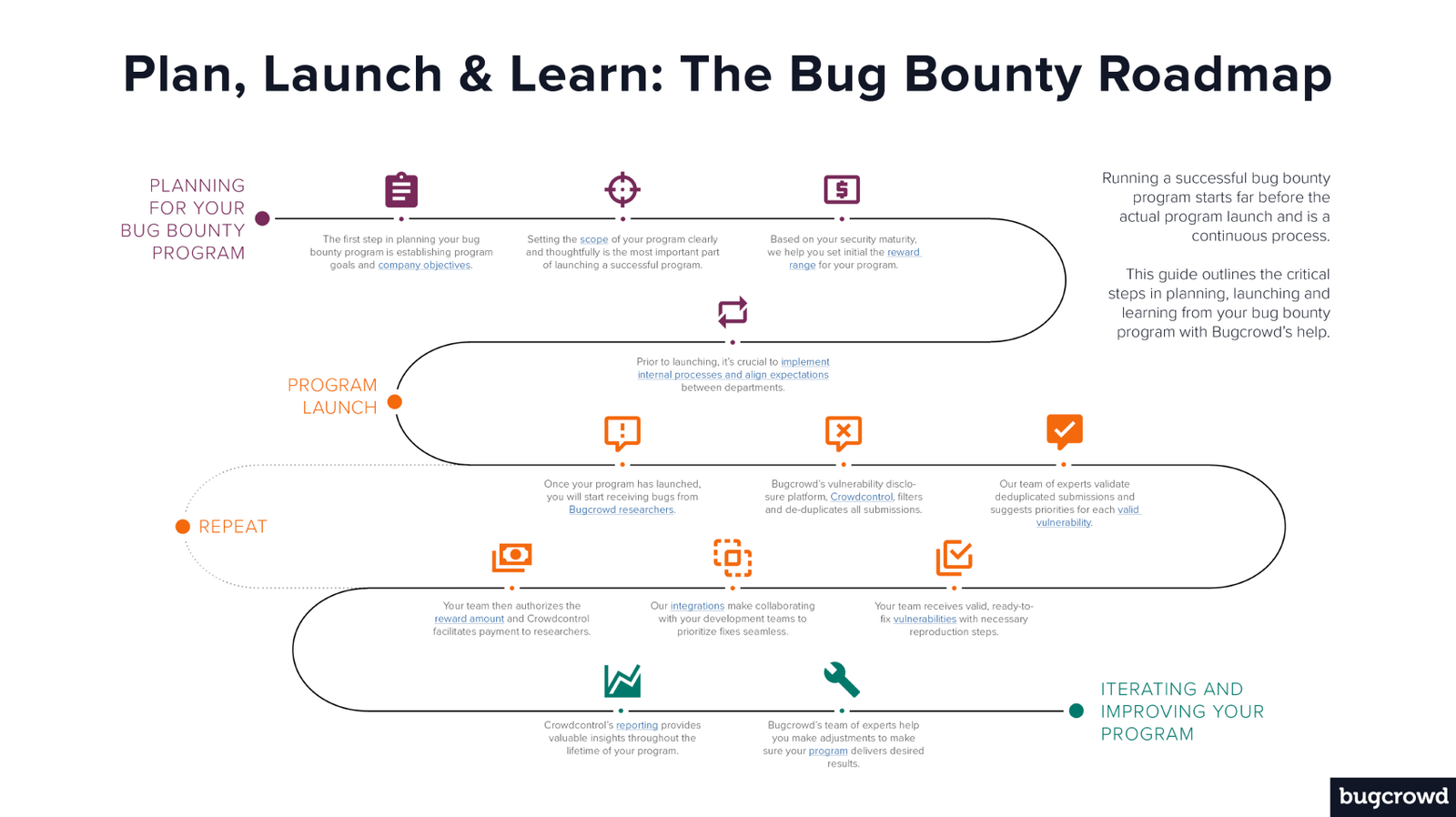
How Bug Bounties Work?
 Open full-size image ↗
SECTION 04
Things You Should Know Before Starting
What is Web? :
Programming Languages :
Networking :
Basic Linux Commands :
SECTION 05
Learning Resources
SECTION 06
Books
- Android Hacker's Handbook
- Automating Bug Bounty
- Bug Bounty Hunting Essentials
- Burp Suite Cookbook
- Burp Suite Essentials
- Mastering Modern Web Penetration Testing
- OWASP Testing Guide
- OWASP Mobile Security Testing Guide
- OWASP Web Security Testing Guide
- Real-World Bug Hunting: A Field Guide to Web Hacking
- The Mobile Application Hacker's Handbook
- The Web Application Hacker's Handbook
- Web Hacking 101
SECTION 07
Courses
SECTION 08
YouTube Channels
SECTION 09
Other Resources
- Bug Bounties 101
- Bug Bounty Cheat Sheet
- Bug Bounty Guide
- Bugcrowd University
- Bug Hunter's Methodology (TBHM)
- Getting Started - Bug Bounty Hunter Methodology
- How to Become a Successful Bug Bounty Hunter
- OWASP Top Ten
- Researcher Resources - How to become a Bug Bounty Hunter - Bugcrowd Hacker Resources
- Researcher Resources - Tutorials - Bugcrowd Hacker Resources
- Resources for Beginner Bug Bounty Hunters by Nahamsec
- The life of a bug bounty hunter
SECTION 10
Practice Labs/Platforms
- Acunetix Art
- Altoro Mutual
- bWAPP
- Damn Vulnerable iOS App (DVIA)
- Damn Vulnerable Web App (DVWA)
- Hacker101
- Hacksplaining
- HackTheBox
- Mutillidae
- OpenDNS Security Ninjas
- OWASP Juicy Shop
- Penetration Testing Practice Labs
- SQL Injection Practice
- TryHackMe
- Vulnerable GraphQL API
- Vulnhub
- WebGoat
- WPScan Vulnerable Wordpress
- Web Security Academy by PortSwigger
Local PentestLab Management Script - Bash script to manage web apps using docker and hosts aliases. Made for Kali linux, but should work fine with pretty much any linux distro.
SECTION 11
Tools
- 100 Hacking Tools and Resources - HackerOne
- Researcher Resources Tools - Bugcrowd - Bugcrowd Hacker Resources
Burp Suite :
Burp Suite is the world's most widely used web application security testing software.
Burp Suite - Application Security Testing Software : https://portswigger.net/burp
Bug Bounty Forum Tool list :
A huge list of tools that can help you with bug bounty researching. (Recon, Exploiting & Scanning, Fuzzing & bruteforcing, Fingerprinting, Decompilers, Proxy plugins, Monitoring, JS Parsing and Mobile Testing)
BugHunter - Tools for Bug Hunting :
Collection of Information Gathering, Mapping, Discovery and Exploitation Tools for Bug Hunting
git clone https://github.com/thehackingsage/bughunter.git
cd bughunter
chmod +x bughunter.py
sudo cp bughunter.py /usr/bin/bughunter

bughunterSECTION 12
Reconnaissance & Enumeration
- Get Subdomains and IPs and filter them
- Find Directories or Files (Fuzzing)
- Webpage and Server Information
- Open Ports and Services
- URL and Parameter
- Use Google, Github, Shodan, Censys, Spyse and Other Search Engines.
Let's Recon (PDF)
Passive Reconnaissance :
- BuiltWith
- Censys
- Shodan
- Spyse - The original address is unavailable. This reference is retained; the linked alternative covers the same learning area. Censys Internet Intelligence
- OSINT Framework
Enumeration Tools :
- Subfinder - Subdomain discovery tool
- amass - In-depth Attack Surface Mapping and Asset Discovery
- assetfinder - Find domains and subdomains related to a given domain
- GetAllUrls - Fetch known URLs from AlienVault's Open Threat Exchange, the Wayback Machine, and Common Crawl
- Hosthunter - Recon tool for discovering hostnames using OSINT techniques
- Altdns - Generates permutations, alterations and mutations of subdomains and then resolves them
- DNSGen - Generates combination of domain names from the provided input
- massdns - A high-performance DNS stub resolver for bulk lookups and reconnaissance
- httprobe - Take a list of domains and probe for working HTTP and HTTPS servers
- subjack - Subdomain Takeover tool written in Go
- GoSpider - Fast web spider
- Arjun - HTTP parameter discovery suite
- qsreplace - Accept URLs on stdin, replace all query string values with a user-supplied value
- gf - A wrapper around grep, to help you grep for things
- Linkfinder - A python script that finds endpoints in JavaScript files
- ffuf - Fast web fuzzer
- gobustter - Directory/File, DNS and VHost busting tool
- CeWL - Custom Word List Generator
Some Useful Links for Reconnaissance & Enumeration :
- CentralOps
- DNS Stuff
- DomainCrawler
- DomainSearch
- DomainTools
- Geographic Location
- Geo IP Tool
- Hurricane Electric
- Internet Domain Survey - This Internet Domain Survey URL is retired. Internet Systems Consortium
- Internet Traffic Report
- Internet-Wide Scan Data Repository
- InterNIC
- IP-Address
- IPinfo Security Portal
- NerdLabs
- Netcraft
- Netinfo
- NetQuery - The original address is unavailable. This reference is retained; the linked alternative covers the same learning area. ICANN Registration Lookup
- Network Tools
- Reverse IP domain check
- RobTex SwissArmyKnife
- Visual Traceroute
- W3DT
- Wayback Machine
- Wayback Robots
- Wayback URLs
- WebTic DNS scan
- Who.IS
- WHOIS / RDAP Lookup
SECTION 13
Web Vulnerabilities
SECTION 14
Vulnerability Scanner
- Acunetix
- Arachni
- Burp Suite
- Joomscan
- Nessus
- Netsparker
- Nexpose
- Nikto
- OpenVAS
- Sn1per
- Vega - The original download page is unavailable. Vega Source Repository
- WPScan
- Wapiti
- Zed Attack Proxy
- W3AF
SECTION 15
Payload / Wordlist
SECTION 16
Reporting
Tools :
SECTION 17
POCs and Write-ups
- Awesome Bug Bounty Write Ups
- BugBounty POC Archives - Security Breached Blog
- Bug Bounty World
- Researcher Resources - Bounty Bug Write-ups - Bugcrowd Hacker Resources
- Netsec on Reddit
- PentesterLand Bug Bounty Writeups
- The Unofficial HackerOne Disclosure
- XSSes - Bug Bounty POC Collection DB - The original domain is now offered for sale. XSS Reference
SECTION 18
Expert's Advice
Start with one vulnerability class in a practice lab. Keep notes on failed hypotheses as well as successful tests. Before submitting a finding, check scope, reproduce it with the minimum evidence, and explain the impact without exaggeration.
PRACTICE PROJECT
A Reproducible Vulnerability Report
Write scope, map a fictional notes app, test a two-account authorisation hypothesis in an authorised lab and document expected behaviour, actual behaviour, impact and remediation.
PROJECT STEP 01
Understand the Vocabulary
A vulnerability is a weakness that can violate a security requirement. An exploit uses such a weakness; a payload is the specific input or action carried by a test. A proof of concept demonstrates the issue under stated conditions. It should be as small and controlled as possible.
A bug-bounty program defines eligible assets, activities and reward conditions. A disclosure program may accept reports without paying rewards. A duplicate report describes an issue already known to the program. Triage is the process of assessing validity, scope, reproducibility and impact; it is not a promise that your preferred severity will be accepted.
Try It Yourself
Define vulnerability, exploit, PoC, scope, duplicate and triage using the fictional notes app. Keep definitions tied to observable behaviour.
Check Your Understanding
How can a real issue be out of scope, and why does that matter before testing?
PROJECT STEP 02
Read the Program before Touching the Target
Scope is more specific than a company name. Check exact domains, applications, account restrictions, prohibited actions, rate limits, reporting channels and disclosure rules. A wildcard does not automatically authorise every connected service or third-party provider. Stop if the rules are unclear or you encounter data you do not need.
Create a short scope note for each exercise. In a local project, define the permitted host as loopback and use synthetic accounts. On a platform, use its assigned lab target. For a real program, follow the published policy and obtain clarification through the permitted channel before testing an ambiguous asset.
Scope for This Project
Application: fictional Notes Lab
Environment: local or explicitly assigned training instance
Accounts: learner-a and learner-b, both controlled by you
Allowed: manual checks of your own sample notes
Excluded: real user data, mass scanning, availability testing
Stop condition: unexpected data or service instability
Expected Result
The note limits both the target and the method. It does not authorise testing a similarly named public service.
Try It Yourself
Save a scope.md file before any lab work. Add a contact or platform support route for unexpected behaviour.
Check Your Understanding
If a lab link redirects to a third-party payment service, does your original scope automatically include it?
PROJECT STEP 03
Learn How the Application Is Supposed to Work
Before searching for vulnerabilities, use the application normally. Identify roles, objects and workflows: creating a note, reading it, sharing it and deleting it. Observe requests and responses in the browser Network panel or a configured testing proxy. Redact session tokens when keeping screenshots or reports.
Authentication answers who the user is; authorisation decides what that user may do. A successful login does not imply access to every object. Business logic adds rules such as who can approve a submission or whether a redeemed invitation may be reused. A clear model of intended behaviour turns random clicking into useful hypotheses.
Try It Yourself
Draw an account-to-note ownership diagram. Create one harmless note under each of your two lab accounts and record the expected access rules.
Check Your Understanding
Can you state the expected result before changing a request? If not, what requirement do you need to learn?
PROJECT STEP 04
Map the Surface with Bounded Reconnaissance
Reconnaissance gathers information; enumeration identifies more detail about an observed service or feature. Start with the permitted application’s navigation, documented API routes and requests your own account produces. Passive sources can provide context, but finding an asset in public records does not add it to scope.
The original resource listed many discovery and scanning tools. Learn their purpose before using them: a proxy inspects requests, a crawler follows routes, a fuzzer generates variations and a scanner looks for patterns. Automated requests can create load or change data. Begin manually and use automation only where the rules and your understanding support it.
- Browser developer tools: inspect requests, status codes, cookies and frontend behaviour.
- Burp Suite Community or OWASP ZAP: learn interception and replay in a lab before enabling active features.
- curl: reproduce a simple request with explicit headers and a clear target.
- Notes and screenshots: preserve the smallest relevant evidence, with secrets removed.
Try It Yourself
Create a route inventory with method, purpose, authentication requirement and object owner. Mark assumptions separately from confirmed observations.
Check Your Understanding
Why is a scanner alert a lead that needs verification rather than a finished report?
PROJECT STEP 05
Build a Minimal Access-Control Proof
Use a lab designed for access-control practice or a small app you own. Sign in as account A and request A’s note. Then, using only your own B account and its synthetic note, test whether A can read B’s object. A secure application should check authorisation on the server for each request. The exact denial may be 403 or 404 depending on the application’s design.
Do not enumerate unrelated object IDs or collect extra records. One controlled cross-account result can establish the issue. Keep the request context, roles and response evidence so the report is reproducible, but replace session cookies with placeholders before sharing.
Record the Expected and Actual Behaviour
Expected: learner-a can read note-a but cannot read note-b.
Observed in the intentionally vulnerable lab:
  learner-a requests note-b using its own session.
  The response contains learner-b’s synthetic note.
Evidence: one redacted request and matching response.
Limit: no other accounts or records were tested.
Expected Result
This is a report example, not a claim about any real website. The issue is missing object-level authorisation, not merely that note identifiers can be guessed.
Try It Yourself
Choose an introductory access-control lab, perform its intended exercise and write your own observation. If you only use the fictional scenario, label it as a simulated finding.
Check Your Understanding
Would changing numeric IDs to random strings alone establish correct authorisation? Explain the server-side check still needed.
PROJECT STEP 06
Write the Report for Reproduction
Use a precise title that names the affected action and consequence. Explain prerequisites, account roles and reproduction steps. Separate what you observed from what you infer. An impact statement should follow from the demonstrated capability instead of promising a complete takeover without evidence.
Recommend a fix at the correct boundary: for object access, check ownership or an appropriate permission on the server before returning the object. Add regression tests for allowed and denied cases. A screen recording can help, but text instructions and a minimal request are easier to review and reproduce.
Report Template
Title: Account A can read Account B’s private lab note
Environment and scope: [assigned lab instance]
Prerequisites: two controlled accounts, one note each
Steps: [numbered actions and redacted request]
Expected: deny access to another owner’s private note
Actual: response returns the other synthetic note
Impact: cross-account disclosure demonstrated for one note
Suggested fix: server-side object authorisation
Retest: A reads A; B reads B; A cannot read B
Attachments: minimal evidence with tokens removed
Expected Result
The reviewer can understand the issue, reproduce it and identify a test for the fix. Real-program reports must use that program’s required format and channel.
Try It Yourself
Complete the report with your own lab evidence. Ask whether every claim is backed by an observation or clearly labelled as an inference.
Check Your Understanding
Can a reviewer reproduce the finding without asking which role, object or request you used?
PROJECT STEP 07
Handle Triage, Disclosure and Retesting
A report can be accepted, rejected, marked duplicate or require more evidence. Respond to specific questions, correct mistakes and avoid overstating impact. Keep communication in the program’s approved channel. Public disclosure depends on its rules and the owner’s process; submitting a report does not automatically authorise publishing private details.
Retesting checks whether the security property now holds and normal functionality still works. Use the same controlled accounts, verify denied access and confirm legitimate owners can still read their notes. Do not turn a retest into a new, broader engagement without permission.
Try It Yourself
Add a retest section with both allowed and denied scenarios. Remove real tokens from every attachment and keep the final report in your project folder.
Check Your Understanding
What would count as proof that the server enforces ownership, rather than the UI merely hiding the link?
PROJECT STEP 08
Build Skills before Chasing Rewards
PortSwigger Web Security Academy, Hacker101 and OWASP’s testing guides provide a stronger starting point than a large unsorted payload list. Practise one vulnerability class, explain its root cause and then test variations in a lab. Study published reports for evidence quality and reasoning, not as a list of targets to repeat.
HackerOne, Bugcrowd, Intigriti and YesWeHack are examples of platforms with program-specific rules. Eligibility, access, payment and disclosure conditions vary. Some links in older directories refer to different services or historical programs, so use the platform’s current official program listing. Your first goal is a correct, useful report-not predictable income.
Try It Yourself
Choose one web-security topic and complete its introductory lessons before moving on. Keep a personal checklist of the assumptions you learned to test.
Check Your Understanding
Can you explain the weakness, a minimal proof, a realistic impact and a fix without relying on a scanner’s wording?
Check Your Finished Project
- Scope and stop conditions are written before testing.
- The proof uses only controlled accounts and synthetic data.
- The report distinguishes observation from speculation.
- Retesting covers both permitted and denied actions.
Access and Offline Reading
The complete guide is free to read here. Linked providers may require accounts or offer paid features; check their own access conditions.
The guide text, examples and illustrations are included in this website’s local copy. External documentation, platform accounts, downloads and hosted labs need an internet connection.